From Header to Host: Investigating Phishing in the SOC
Part of Security Operations · Step 5 of 17 · essential
Browse all 27 field guides
- Alert to Conclusion: Investigating Without Tunnel Vision
- From Header to Host: Investigating Phishing in the SOC (this article)
- How to Think Like a SOC Analyst in an Interview
- Identity Attacks for SOC Analysts: Sessions, Tokens, MFA and Account Compromise
- The IP Isn't the Attacker: A SOC Analyst's Guide to NAT, VPNs and Proxies
- PowerShell Is Not the Alert: Investigating Living-off-the-Land Activity
- Ransomware Before the Ransomware: What the SOC Should See Before Encryption Starts
- SPF, DKIM and DMARC: What They Actually Prove (and What They Don't)
- Threat Hunting for SOC Analysts: Turning a Suspicion Into a Searchable Hypothesis
- Windows Event Logs for SOC Analysts: What an Event ID Actually Proves
- One Alert Is Not the Incident: Scoping Security Incidents in the SOC
- Beyond the Alert: CIS Critical Security Controls v8.1 for SOC Analysts
- Six Functions, Not Six Steps: NIST CSF 2.0 for SOC Analysts
- Check the Scope First: ISO 27001 for SOC Analysts
- Search It, Don't Memorise It: NZISM for Security Practitioners
- Same Problem, Four Lenses: CIS vs NIST vs ISO 27001 vs NZISM
- A Claim Is Not Evidence: Security Assurance for SOC Analysts
- Inherent Risk Comes First: Supplier Security Assurance for Analysts
- Present Is Not Effective: How to Test Security Controls
- A Clean Opinion Is Not Zero Risk: How to Read a SOC 2 Report
- Count Is Not Risk: Security Metrics, KPIs and KRIs That Actually Matter
- Read the Scope Before the Findings: How to Review a Penetration Test Report
- Not the Assessment Itself: How to Design a Supplier Security Questionnaire
- Which Part? Cloud and SaaS Security Assurance
- Lead With the Decision: Executive Security Risk Reporting
- Related Is Not Identical: Framework and Control Mapping Without the Spreadsheet Monster
- CIS, NIST, ISO 27001 and NZISM: The Interview Guide for Security Practitioners
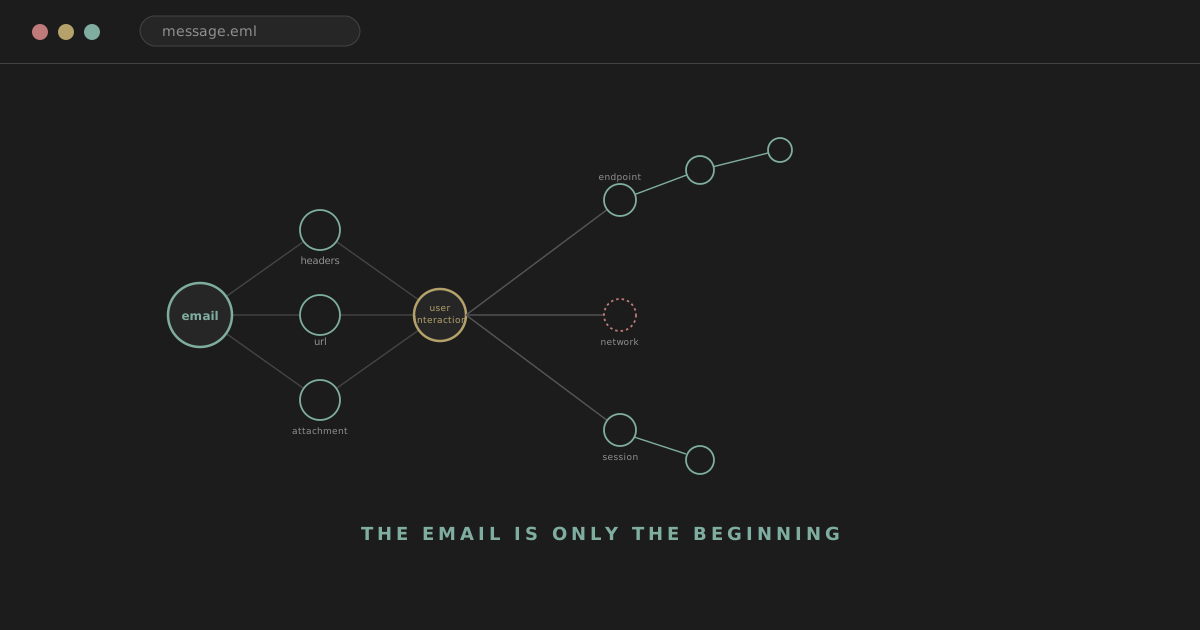
A user forwards an email to the SOC with a short note: "I think this might be phishing." The analyst opens it up. The display name looks familiar. The sender domain is slightly off, though nothing dramatic. SPF passes. DKIM passes. There's a Microsoft 365 login link. No obvious attachment.
Is it malicious? Possibly. But that question, on its own, is a much smaller part of the job than it feels like in the moment. A phishing investigation is not complete when you've decided whether the email looks bad. The questions that actually matter come after that: was it delivered? Who received it? Who interacted with it? What happened after they did? Was a credential entered? Was a session established? Did malware execute? Did the attacker gain persistence anywhere? Did the same campaign land on other users? What, if anything, now needs to be contained?
Email
↓
Sender / headers
↓
URLs / attachments
↓
Delivery
↓
User interaction
↓
Endpoint
↓
Identity
↓
Scope
↓
Containment
That's the shape this article follows, and it's a considerably longer road than most people picture when they think "phishing investigation."
analyst@thefish.nz:~$ cat contents.txt
Sections
More sections
- Scenario: a false alarm
- Linking messages into a campaign
- Threat intel and sandboxes
- Common mistakes
- User-reported phishing
- Analyst mindset
- Email verdict vs incident verdict
- Detection ideas
- Correlation
- Quick reference workflow
- SOC interview refresher
- Six scenarios to practise
- Quick reference table
- The point
Don't start with "is this phishing"
A binary first question tends to trap analysts in visual analysis, staring at fonts and logos, arguing with themselves about whether a domain looks close enough to the real one. A more useful sequence:
What is the message trying to make the user do?
↓
What evidence supports legitimacy or deception?
↓
Was the message delivered?
↓
Was there user interaction?
↓
Did interaction create security impact?
The first question, what is this trying to make the user do, is worth answering before anything technical, because it tells you what to actually check for downstream: a credential harvest wants a login attempt, an invoice lure wants a payment change, an attachment-based lure wants execution. Everything after that follows from what the message was actually built to achieve.
Email anatomy, briefly
Worth knowing what a handful of fields can and can't tell you, without turning this into an RFC walkthrough. From is what the recipient sees, and it's trivially set by whoever sends the message. Return-Path is typically where bounce messages get directed, and usually mirrors the envelope sender. Reply-To is where a reply would actually go, which can differ from From for entirely legitimate reasons. Message-ID is a unique identifier assigned at creation, useful for searching your own mail security telemetry for the exact same message elsewhere. Received headers record the hop-by-hop path the message took through mail infrastructure. Authentication-Results records what SPF, DKIM and DMARC concluded. Subject, body, URLs and attachments are the content itself, and the actual payload of whatever the message is trying to achieve.
Display names are weak evidence
From: "Microsoft Support" <randomdomain.example>
Users notice the display name and rarely look past it, which is exactly why attackers set it to whatever looks trustworthy. It's worth resisting the inverse mistake too: plenty of entirely legitimate services send through third-party infrastructure with a display name that doesn't match the sending domain at all. A mismatch is a reason to check further, not a verdict on its own.
From, Return-Path and Reply-To are three different questions
From is what the user sees. Return-Path is where bounces go. Reply-To is where a genuine reply would land. A Reply-To that differs from From can be a useful signal, particularly when it points somewhere that has nothing to do with the organisation the message claims to represent. It's worth knowing that legitimate marketing and automated systems do this constantly and for entirely mundane reasons, so treat a mismatch as worth a closer look rather than automatic proof of anything.
Received headers, read from the bottom up
Each hop a message passes through can add its own Received header, and the convention worth knowing is that you generally read them from the bottom of the stack toward the top to reconstruct the path the message actually took, since each new hop prepends its own entry above the ones before it. Internal trust boundaries matter here: infrastructure you control and trust can be relied on to have logged accurately. Headers claiming to originate from before that point can, in principle, be added or forged by whoever composed the message. The most useful question to ask isn't "what do the headers say" in isolation, it's which headers were added by infrastructure you actually trust.
Authentication-Results: SPF, DKIM, DMARC
This gets a full treatment in the SPF, DKIM and DMARC guide, so here's the condensed version relevant to phishing triage specifically. SPF checks whether the sending infrastructure was authorised for the envelope sender's domain. DKIM checks a cryptographic signature tying the message to a signing domain and confirming the signed content hasn't been altered in transit. DMARC checks whether the domain that actually authenticated, via SPF or DKIM, aligns with the domain shown in the visible From address.
Watch out
SPF pass, DKIM pass, DMARC pass does not equal safe email. A malicious actor can register their own domain, configure SPF correctly, configure DKIM correctly, and pass DMARC cleanly, because every one of those checks is only asking whether the domain that authenticated is genuinely responsible for the message it authenticated. They say nothing at all about whether that domain, or the person behind it, has honest intentions.
Authentication answers "was this message authorised by the domain it claims to represent." It does not, and was never designed to, answer "is the sender's intention legitimate."
A practical header-investigation sequence
What domain is actually visible to the user? What envelope or return domain was used? Which domain signed with DKIM? Did SPF, DKIM and DMARC each pass? Which Received headers were added by infrastructure you trust? What infrastructure actually originated the message? Does Reply-To differ from From? Is Message-ID consistent with the infrastructure you'd expect for this sender? Does the whole path resemble the legitimate sender's normal mail route? Comparing against a known genuine message from the same sender, where you have one on hand, is often more useful in practice than trying to memorise what a "normal" header pattern is supposed to look like.
Domain analysis
Worth examining closely: the exact spelling of the domain, any subdomains involved, the actual registrable domain underneath them, lookalike characters, extra words inserted to look plausible, whether the domain was registered recently, and whether an unrelated domain is sitting behind a familiar-looking display name.
microsoft.com
versus
hxxps://microsoft-login[.]example
or
hxxps://secure-microsoft365[.]example
None of this needs to become a full typosquatting catalogue to be useful. The pattern is always the same: does the registrable domain, stripped of subdomains and decoration, actually belong to who it claims to.
WHOIS and RDAP
Registration data can add useful context: creation date, registrar, nameservers, and rough registration age where it's available. Worth treating carefully: a newly registered domain is suspicious context, not proof. Plenty of entirely legitimate marketing campaigns, product launches and small businesses register domains and start sending from them within days.
DNS pivots
Worth checking A and AAAA records, MX records, TXT records, nameservers and CNAME entries. Where is the domain actually hosted? Does it have mail infrastructure that looks like a real sending domain, or nothing at all? Are there related subdomains worth pulling on? Passive DNS is genuinely useful for building context here, but it's worth not overstating what it proves about ownership or intent on its own.
Certificate transparency, as optional enrichment
Certificate transparency logs can surface related hostnames issued under the same certificate authority activity, which is useful for understanding the shape of an attacker's infrastructure. It's context for building a picture, not proof of ownership or malicious intent by itself.
URLs
Don't visually scan link text and stop there. A link can display https://microsoft.com while the actual href points somewhere else entirely, and the only way to know is to check the real destination directly rather than trusting what's rendered on screen.
Worth checking: the actual href, the domain it resolves to, whether it goes through a redirect, whether a URL shortener is involved, nested redirect parameters, the path and query string, punycode (used to represent non-ASCII characters that can visually mimic legitimate letters), unusual subdomains, usernames embedded in the URL itself, and IP-based URLs with no domain name at all.
Whenever writing up a suspicious domain or URL, use defanged notation, for example hxxps://login-example[.]com, and never paste a genuinely live malicious link into a ticket, chat, or document where it might get clicked by accident.
Redirect chains
The first visible URL is very often not the final destination.
Email link
↓
URL shortener
↓
tracking service
↓
compromised site
↓
credential phishing page
Worth mapping the whole chain rather than stopping at the first hop: which redirects actually occurred, which domains were involved at each step, and whether any legitimate services were abused along the way as an unwitting redirect stage. This matters because simplistic domain blocking based only on the first URL seen can miss the actual destination entirely.
Investigate URLs safely
Don't browse a suspicious link directly from an ordinary workstation. Worth using dedicated URL scanning services, a sandboxed or isolated browsing environment, whatever analysis capability your mail security platform already provides, and proxy logs to see what happened when the link was actually visited by a real user, rather than manually reproducing the click yourself on unprotected infrastructure.
VirusTotal and URL reputation are enrichment, not a verdict
VirusTotal and similar services can show vendor detections, historical observations, and infrastructure relationships. Worth being realistic about the limits: no detections doesn't mean safe, since newly stood-up phishing infrastructure may simply be unknown to every vendor yet. A single detection doesn't automatically prove malicious intent either, and a compromised legitimate site can carry a perfectly good reputation right up until the moment it's abused. Reputation is context, not conclusion.
Attachments
Common types include Office documents, PDFs, archives, HTML files, images, executables and scripts. This isn't malware analysis training, it's the first set of questions worth asking about any attachment: what's the filename, what's the actual file type versus the extension, what's the MIME type, what's the hash, what's the size, where did it come from, was it actually delivered, was it opened, and was it executed.
Extension is not the same thing as file type
invoice.pdf.exe is a classic example, and mismatches between a file's claimed extension, its actual MIME type, and its true file signature are all worth checking rather than trusting the filename at face value.
Hash enrichment
A hash lookup can surface reputation, prior sightings, and malware-family associations. A hash absent from VirusTotal is not proof of safety, particularly for something freshly built for this specific campaign. A hash confirmed malicious is strong evidence, and it's still worth confirming separately whether the file was actually delivered, written to disk, and executed, rather than assuming all three followed automatically from the hash match.
Password-protected archives
Attackers use these deliberately to evade automated scanning and shift the extraction step onto the user, who has to manually enter a password usually supplied in the email body itself. Legitimate business workflows use password-protected archives too, for entirely mundane reasons. Worth checking whether the password sits in the email body, whether the archive type is unusual for this sender, what's actually inside once extracted, and whether user interaction was required to get there.
HTML attachments
Increasingly common, and worth understanding specifically: an HTML attachment can render a fake login page locally, redirect the browser elsewhere, or contain obfuscated script that builds a malicious page on the fly once opened. Worth investigating what the attachment actually does when rendered, using safe analysis methods rather than opening it on a normal endpoint.
PDFs
Can be genuinely legitimate documents, simple link-delivery vehicles, pure social-engineering lures with no technical payload at all, or, occasionally, exploit carriers. Don't assume PDF equals safe just because the format itself is common and mostly innocuous.
QR-code phishing
Worth a short mention on its own, because it's become common enough to expect. QR codes are attractive to attackers because they move the interaction onto a personal mobile device, hide the actual URL from any visual or automated inspection of the email itself, can bypass some URL-parsing security controls entirely, and take the user outside whatever managed workstation protections exist. The investigation still asks the same questions as any other link: what's the actual destination URL, who received the message, who scanned the code, and what identity activity followed.
The lure matters
Phishing is social engineering first and a technical delivery mechanism second. Common themes worth recognising: password expiry notices, a shared document, an invoice, a voicemail notification, payroll or HR content, an MFA-related prompt, a delivery notification, or urgent payment requests. This doesn't need to become an exhaustive catalogue to be useful. The one question worth holding onto: what action is the attacker actually trying to induce.
Delivery
Move beyond the single submitted email. Was it actually delivered to the mailbox, or blocked, quarantined, or removed after the fact? Search your email security telemetry using the Message-ID, sender, sender domain, subject, URL, attachment hash, recipient, and any campaign identifiers your platform tags messages with, to establish the full delivery picture rather than relying on the one copy that happened to get reported.
Scope: one report rarely means one affected user
One user reporting one email does not mean there is one affected user. Worth pivoting on the sender, subject, Message-ID, URL, domain, attachment hash, attachment name, Reply-To address, and any broader campaign pattern your tooling can surface. Worth asking how many recipients actually received it, which business units were touched, whether executives, finance staff or administrators were among them, whether any external recipients were included, and whether any distribution lists carried it further than the individual inboxes you can see directly.
Similar doesn't mean identical
Campaigns vary the subject line, sender address, and generate unique URLs or per-recipient identifiers and attachment hashes across different copies of what is functionally the same attack. Exact IOC matching can miss related messages entirely. Worth thinking in terms of campaign patterns, shared infrastructure and structural similarity rather than requiring a byte-for-byte match before treating two messages as related.
User interaction
This is the point where phishing analysis becomes incident investigation rather than email triage. Did the user read the email? Click the link? Download the attachment? Open it? Run anything? Enter credentials? Approve an MFA prompt? Install software? Reply? Send a payment? None of these should be assumed from any of the others.
Watch out
Click does not equal compromise. A click can lead to a blocked page, a dead link, entirely legitimate content the URL happened to redirect to, an actual phishing page, or a malware download, and you need further evidence to know which. It's equally worth being honest in the other direction: no known click does not guarantee no impact, if the telemetry available to you is incomplete.
Web and proxy evidence
Useful sources include proxy logs, secure web gateway logs, DNS query logs, firewall logs, browser telemetry, and EDR-reported network events. Worth checking whether the device actually resolved the domain at all, whether it connected, whether the connection was blocked, what URL and HTTP status resulted, how much data moved, whether anything downloaded, and what connections followed afterward.
Credential phishing and the pivot to identity
If the page was built to steal credentials, the investigation needs to move into identity telemetry. Worth checking for authentication shortly after the click, a new source IP, a new device, a new ASN, MFA prompt activity, failed and successful logons, and any account changes that followed. Worth resisting the shortcut of assuming a click followed by a new login automatically means the credentials were stolen and used; correlate the actual timing and context rather than treating proximity alone as proof.
The MFA sequence worth watching for
Phishing email
↓
Fake login page
↓
credentials entered
↓
MFA prompts
↓
successful session
Worth asking: did the user actually approve an MFA prompt around this time? Was an MFA method changed? Did an unusual session begin? Did mailbox activity follow shortly after? This connects directly to the reasoning in the Identity Attacks guide, which covers this territory in far more depth.
Adversary-in-the-middle phishing
A phishing site can proxy the genuine authentication flow in real time and capture the resulting session material once MFA completes, rather than relying on a crude static fake page. The SOC implication is direct: MFA success does not guarantee the resulting session is legitimate, if the method used can be relayed this way.
Endpoint impact
If the phishing message delivered a file or script that actually ran, pivot into endpoint telemetry: was the attachment written to disk, was it opened, what was the parent process, what child processes appeared, what was the command line, what network activity followed, what files were created, is there anything resembling persistence, and did EDR raise anything at all.
outlook.exe
↓
winword.exe
↓
powershell.exe
↓
external connection
This is exactly the territory the PowerShell and LOLBins guide covers in depth, and the same reasoning applies here directly: the process names alone tell you very little without the surrounding context.
Analyst tip
Attachment opened does not equal payload executed. A file can be previewed, opened, blocked, sandboxed, or otherwise prevented from running its actual content by the platform it was opened in. You need genuine endpoint evidence of execution, not just evidence that the file was clicked on.
Browser-based phishing without an attachment
Plenty of phishing has no attachment at all. Worth checking browser process activity, the actual URLs visited, any files that downloaded as a result, any browser extensions installed around the same time, and any indicators consistent with credential-theft malware or session theft specifically.
Identity impact
Once credential compromise is suspected, worth reviewing sign-in history, MFA activity, any new devices or sessions, mailbox rules, forwarding configuration, OAuth application grants, password or MFA method changes, file access across SharePoint and OneDrive, and, where the account is privileged, any administrative actions taken. This is exactly the checklist covered in full in the Identity Attacks guide.
Business email compromise
Credentials stolen
↓
Mailbox access
↓
Attacker watches conversation
↓
Payment details altered
Worth stating plainly: this can happen with no malware anywhere, no EDR alert, and no suspicious executable at all. The entire incident can live in identity and email telemetry, which is precisely why an investigation that stops the moment endpoint scanning comes back clean is stopping in the wrong place.
Reply-chain attacks
An attacker can send phishing from a legitimate, already-compromised mailbox, replying into a genuine existing thread. In that case SPF may pass, DKIM may pass, DMARC may pass, the sender may be someone the recipient genuinely knows, and the thread itself may be entirely real up until the point the attacker inserted themselves into it. This is one of the more important points in this whole article: authentication passing tells you the domain is genuine. It says nothing about whether the specific account sending this specific message has been compromised.
Internal phishing
Phishing sent from a compromised internal account is harder to catch precisely because everything that normally raises suspicion is absent: a trusted sender, an internal domain, an existing relationship, a normal mail route, and authentication that passes cleanly because it genuinely is the real domain.
Watch out
Email authentication is not malicious-intent detection, and internal phishing is where that distinction matters most.
Thread hijacking
Attackers can use genuine existing message history to make a phishing attempt considerably more credible. Worth watching for an unusual link or attachment suddenly appearing partway through an established thread, a shift in language or writing style, a new Reply-To address, an unusual sending session for that account, or any other evidence pointing toward mailbox compromise rather than a fresh external attempt.
Containment
Email. Quarantine or remove matching messages, block the malicious sender or domain where justified, block the specific URLs involved, block the attachment hash.
Identity. Reset credentials, revoke active sessions, remove any MFA methods the attacker registered, remove malicious OAuth grants, remove forwarding or inbox rules the attacker created, disable the account where warranted.
Endpoint. Isolate the device, remove malicious files, terminate the relevant process, collect evidence before anything changes further, rebuild the endpoint where appropriate.
Analyst tip
Containment should always be proportionate to actual, established impact. Don't isolate every endpoint that merely received a copy of a phishing email with no evidence anyone interacted with it at all.
Scope after a confirmed compromise
If one account is confirmed compromised, worth asking whether the attacker used it to send further phishing, access internal data, reach shared drives, change mailbox rules, add applications, or specifically target finance or executive accounts. Scope can expand from one phishing email into a full identity incident, an endpoint compromise, or a multi-user campaign, and it's worth actively checking for that expansion rather than assuming the incident ends at the account you started with.
A worked investigation
A finance user reports a Microsoft 365 "shared document" email.
08:42  email delivered
08:49  user clicks link
08:49  DNS query to suspicious domain
08:50  TLS connection
08:51  successful cloud authentication from new infrastructure
08:54  inbox forwarding rule created
09:03  mailbox search activity
09:11  new phishing email sent from compromised account
08:42, email delivered. Observation: the message reached the mailbox. Interpretation: nothing yet, delivery on its own is unremarkable. Confidence: unchanged. Next pivot: check whether the same message was delivered to anyone else.
08:49, user clicks the link. Observation: the recipient interacted with the URL. Interpretation: this establishes interaction occurred, not what the destination actually was or did. Confidence: slightly raised, purely because interaction happened at all. Next pivot: establish exactly where the link led and what the page presented.
08:49, DNS query to a suspicious domain. Observation: the endpoint resolved a domain worth attention. Interpretation: consistent with the click actually reaching an external destination rather than being blocked before resolution. Confidence: raised further. Next pivot: check reputation, registration age and any prior sightings of this domain.
08:50, TLS connection established. Observation: an encrypted connection followed the DNS resolution. Interpretation: the user's browser successfully reached whatever was hosted there. Confidence: raised, this rules out the possibility that the attempt was silently blocked. Next pivot: check proxy or web telemetry for what was actually served on that connection.
08:51, successful cloud authentication from new infrastructure. Observation: a login succeeds from infrastructure that doesn't match this user's history, one minute after the TLS connection. Interpretation: strongly consistent with credentials being entered on a phishing page and immediately replayed, or with a session captured via an adversary-in-the-middle flow. Confidence: high. Next pivot: check MFA status on this authentication and whether it matches a genuine prompt the user actually approved.
08:54, inbox forwarding rule created. Observation: a new rule appears three minutes after the suspicious authentication. Interpretation: this is a deliberate persistence step, not routine mailbox housekeeping, given the timing. Confidence: very high. Next pivot: read the rule itself, its destination, and whether it's hidden.
09:03, mailbox search activity. Observation: the account is searching its own mailbox content. Interpretation: consistent with reconnaissance, likely looking for financial or invoice-related conversations specifically, given the original lure. Confidence: essentially confirmed at this point. Next pivot: identify what was searched for and opened.
09:11, a new phishing email sent from the compromised account. Observation: the account itself is now sending phishing. Interpretation: the incident has expanded from one compromised user into an active campaign originating from trusted internal infrastructure. Confidence: fully confirmed, and now a scoping and containment priority rather than an open question. Next pivot: identify every recipient of the message just sent, and move immediately to session revocation, credential reset, and forwarding rule removal.
Second worked scenario: a malicious attachment
A shorter, contrasting shape:
Email attachment
↓
user opens document
↓
Office launches script interpreter
↓
external connection
↓
payload written
The investigation here shifts fast, from email security territory into endpoint, network and identity work simultaneously, because the moment Office spawns a script interpreter, the question stops being "was this email malicious" and becomes "what did the resulting process actually do."
Third scenario: a false alarm
Worth including at least one benign example, because forcing a malicious conclusion is its own kind of mistake. A user reports an email from an unfamiliar SaaS sender, with a Return-Path that differs from From, a valid DKIM signature, a tracking link, and a domain that was registered recently. On investigation: it turns out to be an expected business application the organisation is actively onboarding, sent by a known vendor, delivered identically to several other legitimate users, with no malicious redirects anywhere in the chain, and entirely normal authentication throughout. The lesson: unfamiliar and unusual are not the same as malicious, and the investigation's job is to establish which one this actually is, not to confirm a suspicion that formed on first glance.
Linking messages into a campaign
Useful shared properties for tying several emails together: sending infrastructure, a display-name pattern, URL structure, a shared redirector, attachment metadata, lure text, subject-line pattern, landing page, and timing. Exact IOC matches aren't required to treat messages as part of the same campaign; structural similarity across enough of these properties is often sufficient and considerably more useful in practice.
Threat intelligence, sandboxes, and their limits
Useful sources include URL and domain reputation, file reputation, passive DNS, WHOIS and RDAP data, sandbox output, and phishing-specific databases. Threat intelligence enriches the local investigation. It doesn't replace mail logs, endpoint telemetry, identity telemetry, or actual user interaction data, all of which tell you what happened in your own environment specifically.
Sandboxes can genuinely help establish a redirect chain, observed file behaviour, process creation, and network destinations reached. Worth knowing the limits: evasion techniques aimed specifically at sandboxes, geofencing that only serves malicious content to specific regions, links that expire before analysis happens, pages that require a genuine login before revealing anything, one-time tokens that only work once, and deliberately delayed malicious behaviour. A sandbox seeing nothing does not mean the destination was safe.
Phishing infrastructure doesn't stay still
Domains and pages can be disabled, redirected elsewhere, have their content changed, serve only specific targeted users, or only operate for a few hours before going dark. Historical telemetry, what your systems actually recorded at the time, matters more here than trying to re-check a link days later.
If the URL is already dead
Don't close the investigation automatically just because a link no longer resolves. You can still establish who clicked it, what the DNS and proxy history shows from when it was live, what endpoint activity occurred, what identity events followed, and the full scope of who else received the same campaign.
Screenshots are useful context, weak technical evidence
A screenshot can usefully demonstrate the lure, the branding used, and the action being requested. It doesn't prove the actual sending infrastructure, the real destination URL, the delivery path, or whether any interaction genuinely occurred. Treat it as helpful colour, not as a substitute for the technical evidence itself.
QR phishing and the mobile visibility gap
When interaction shifts onto a personal or mobile device, corporate visibility can drop sharply. The SOC may still have email telemetry and identity telemetry, while having essentially nothing from the device's own browser or endpoint activity. This is exactly why identity investigation becomes especially important in QR-code and mobile-targeted phishing specifically, since it may be the only visibility that survives the jump off managed infrastructure.
Common mistakes
Deciding purely on spelling or grammar. Assuming a professional-looking email is automatically safe. Assuming SPF passing means safe. Assuming DMARC failing means definitely malicious. Only ever analysing the single submitted copy of the email. Not checking campaign scope at all. Clicking a suspicious link directly from a normal workstation. Treating VirusTotal as the final verdict. Assuming no reputation hit means safe. Assuming a click automatically means compromise. Assuming no known click automatically means no compromise. Assuming an attachment being present means it executed. Investigating the email while ignoring identity telemetry entirely. Investigating the email while ignoring endpoint telemetry entirely. Resetting a password without revoking sessions. Deleting one email and declaring the whole campaign contained. Failing to check forwarding rules or OAuth grants. Blocking an external sender while missing that an internal account is also compromised. Ignoring the possibility of reply-chain compromise on an otherwise trusted thread.
"Looks legitimate" is not evidence
Professional design, correct grammar and convincing branding mean very little on their own. Equally, poor grammar or an amateurish layout is not proof of phishing either. Rely on the technical evidence and the surrounding context, not on how polished the message happens to look.
User-reported phishing is genuinely valuable
Users can supply context telemetry alone can't: "I wasn't expecting this." "I don't recognise this sender." "I clicked it." "I entered my password." "I approved the MFA prompt." "I downloaded the file." "The page disappeared before I could do anything." None of this is a reason to blame the person reporting it. The goal is simply getting accurate information quickly, from someone who was actually there when it happened.
Questions worth asking the user
Did you click the link? Did you enter any credentials? Did you approve an MFA prompt? Did you download or open anything? Did anything appear to run? Did you reply? Did you make a payment? What device were you using at the time? Neutral, specific wording gets more accurate answers than anything that sounds like an accusation, and a user who feels safe reporting honestly is worth far more to a SOC than one who's learned to stay quiet.
Analyst mindset
The same discipline covered in the SOC interview methodology piece applies directly here: what do I actually know, what am I currently assuming, what happened immediately next, what evidence would confirm real impact, what evidence would rule it out, and who else might be affected.
The email verdict and the incident verdict are not the same thing
Worth keeping these explicitly separate. A possible email verdict: malicious, suspicious, benign, spam, unwanted. A possible incident impact: no interaction at all, a link clicked but blocked, credentials genuinely entered, a confirmed account compromise, malware that actually executed, a compromised endpoint, a full BEC incident, or a campaign affecting multiple users across the organisation. A malicious email can result in no compromise whatsoever. A legitimate-looking email sent from a genuinely compromised account can result in serious, sustained compromise. The two verdicts answer different questions, and conflating them is one of the more common ways a phishing investigation gets called finished too early.
Detection ideas worth building
A newly registered domain combined with a credential-lure pattern. An external sender spoofing an executive's display name. Repeated, structurally similar messages landing across many users. A first-seen sender paired with a suspicious URL. An email click followed by an unfamiliar authentication event. MFA prompts appearing shortly after a phishing click. A mailbox rule created shortly after unusual authentication. An Office application spawning a scripting process. An internal user suddenly sending campaign-style messages outward. None of these are universal rules, and every one needs tuning against your own environment's actual baseline before it's genuinely useful rather than noisy.
Correlation is where phishing investigation actually becomes powerful
Email
  +
DNS / Proxy
  +
Endpoint
  +
Identity
  +
Mailbox
  =
Impact assessment
No single source in that list tells the whole story on its own. Together, they're what separates a genuinely defensible impact assessment from a guess dressed up as one.
Quick reference workflow
- Preserve and identify the message.
- Analyse trusted header data.
- Inspect sender, domain, URLs and attachments.
- Determine delivery scope.
- Determine user interaction.
- Check endpoint and network evidence.
- Check identity and mailbox impact.
- Scope related users, messages and activity.
- Contain based on actual impact.
- Document and improve detections.
Not rigid. Sufficiently severe evidence, an active session takeover in progress, for instance, may justify moving straight to containment before every earlier step is fully complete.
Things worth being able to explain in a SOC interview
The practical difference between From, Reply-To and Return-Path. What Received headers show and why trust boundaries matter when reading them. What SPF, DKIM and DMARC each actually check, and their limits. Why passing DMARC doesn't mean an email is safe. How to properly investigate a URL rather than just reading the visible link text. The difference between a known file hash and confirmed execution. Why a click isn't automatically compromise, in either direction. How to scope a phishing campaign beyond the single reported message. What identity follow-up looks like after suspected credential phishing. Why session revocation matters more than a password reset alone. What business email compromise typically looks like. Why internal phishing and reply-chain attacks are especially hard to catch. How endpoint and identity telemetry correlate with email evidence. And how to contain proportionately to actual, established impact.
Six scenarios to practise
A user reports an email with SPF, DKIM and DMARC all passing. A strong response doesn't stop at the authentication result, checks the actual registrable domain and its age, and investigates the URL destination independently of whether authentication passed.
Five users receive the same credential-phishing link. A strong response establishes total delivery scope first, checks which of the five actually interacted with it, and pivots into identity telemetry for anyone who did.
A user clicked the link but says they entered nothing. A strong response still checks proxy and DNS evidence for what the page actually did, and doesn't take the self-report as the sole source of truth without corroboration.
A user entered credentials and approved an MFA prompt. A strong response moves immediately into identity investigation: new sessions, MFA changes, mailbox rules, OAuth grants, and treats this as likely compromised until evidence says otherwise.
An Office attachment was opened and PowerShell subsequently started. A strong response pivots straight into endpoint telemetry, checking the full process chain, command line, and any network activity that followed.
A phishing email was sent from a legitimate internal account. A strong response treats this as probable mailbox compromise from the outset, checks sign-in history and mailbox rules on the sending account, and scopes who received the outbound message.
Quick reference table
| Evidence source | What it can tell me | What it cannot prove |
|---|---|---|
| Email headers | Path, authentication results, sender identity claims | Sender's intent, or whether content is malicious |
| SPF | Whether the sending infrastructure was authorised | Whether the message content or sender is trustworthy |
| DKIM | Whether the signing domain is genuine and content unaltered | Whether that domain is honest, or the account uncompromised |
| DMARC | Whether the authenticated domain aligns with the visible sender | Whether the aligned domain itself is legitimate |
| URL reputation | Known detections, historical sightings | Safety of a brand-new or freshly abused destination |
| File hash | Prior sightings, malware-family association | Whether this specific file was actually delivered or run |
| Proxy logs | Whether a connection was made, blocked, or allowed | User intent, or what happened after a permitted connection |
| EDR | Process, file and network activity on the endpoint | Activity outside its visibility, e.g. mobile or unmanaged devices |
| Identity logs | Authentication, session and device activity | Whether the accepted credentials belonged to the real user |
| Mailbox audit | Rules, forwarding, delegation, access activity | Intent behind a legitimate-looking configuration change |
This piece leans directly on several others: the SPF, DKIM and DMARC guide for the authentication detail behind the header section above, the Identity Attacks guide for everything after a credential phish lands on the identity side, the PowerShell and LOLBins guide for the endpoint side once an attachment actually executes, Windows Event Logs for the underlying telemetry behind a lot of the endpoint pivots, The IP Isn't the Attacker for the network and infrastructure reasoning behind domain and IP checks, Alert to Conclusion for the general investigation methodology this article builds on throughout, and How to Think Like a SOC Analyst in an Interview for the analyst-mindset section above.
The point
The email verdict and the incident verdict are not the same thing. A message can be genuinely malicious and still cause no compromise at all. A message can look entirely legitimate, sent from a real, trusted, currently-compromised account, and still be the reason an organisation ends up with a serious incident. A good phishing investigation follows the evidence the whole way: message, delivery, interaction, endpoint, identity, scope, impact. Stopping at "is this email phishing" answers the smallest and least useful part of that chain.